author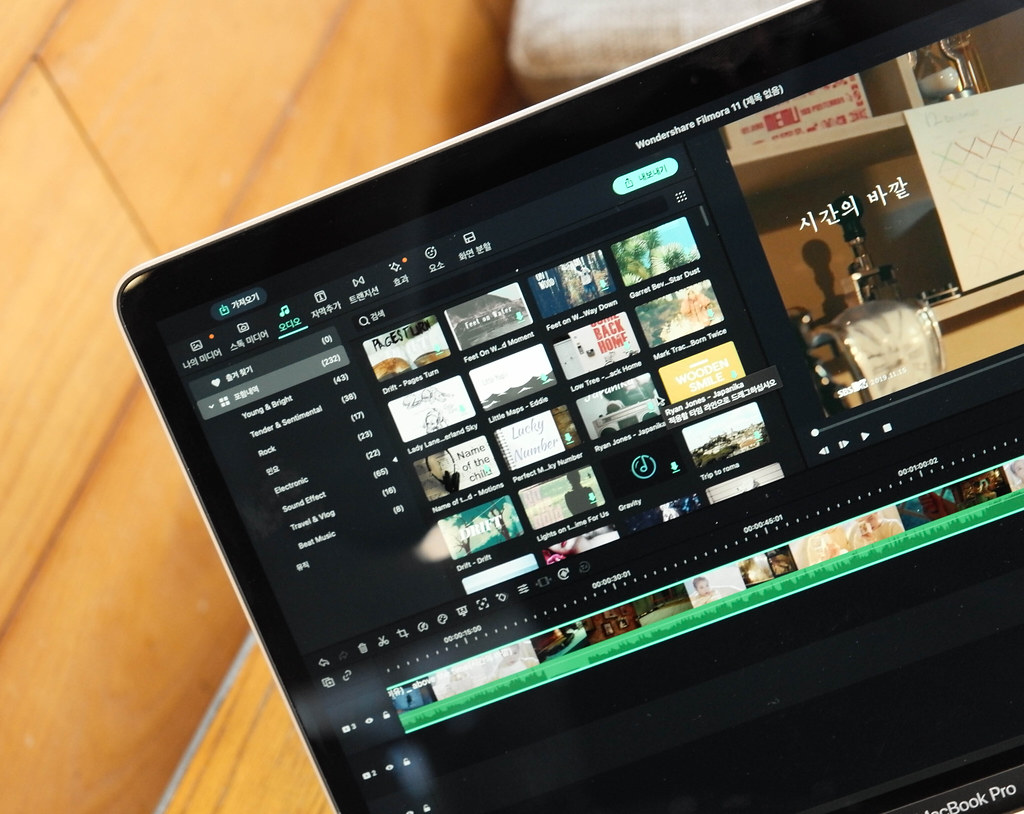
Wondershare filmora PC vs Mobile
🎬 Wondershare Filmora PC Software vs Mobile App: Complete Comparison for Indian Creators
Video editing is no longer just a task for professionals. With social media platforms like YouTube, Instagram Reels, and YouTube Shorts dominating India’s digital space, more users—from students to influencers—are seeking powerful but easy-to-use video editing tools.
Wondershare Filmora has emerged as a favorite video editing tool among Indian users due to its user-friendly interface, feature-rich platform, and compatibility across both PC and mobile devices. But which version is right for you?
In this detailed guide, we’ll compare Wondershare Filmora for PC and FilmoraGo (mobile version), focusing on features, performance, pricing, pros and cons, and suitability for different user types in India.
📜 Table of Contents
- Overview of Wondershare Filmora
- What is Filmora for PC?
- What is FilmoraGo for Mobile?
- Feature Comparison: PC vs Mobile
- Pricing in India
- Performance and Usability
- Pros and Cons of Each
- Who Should Use Which?
- Indian Market Insights & Recommendations
- Final Verdict
🎥 1. Overview of Wondershare Filmora
Wondershare Filmora is a well-known video editing software brand developed by Wondershare Technology. It offers powerful editing capabilities with a simplified user experience. It caters to both beginners and intermediate editors, making it ideal for:
- YouTubers
- Instagram content creators
- Vloggers
- Digital marketers
- Students
- Small businesses
It comes in two main versions:
- Filmora for PC/Mac (Desktop software)
- FilmoraGo (Mobile app for Android/iOS)
💻 2. What is Filmora for PC?
Filmora for Windows/Mac is a full-fledged video editing software for desktops and laptops. It supports multi-track editing, keyframing, color grading, motion tracking, and more—making it suitable for semi-professional and advanced users.
✅ Key Features:
- Multi-layer timeline
- Chroma key (Green screen)
- Keyframing animations
- Motion tracking
- Screen recording
- Audio editing & voiceovers
- Over 1000+ transitions, titles, and effects
- AI Smart Cutout, Auto Beat Sync (Latest versions)
- 4K export supported
- Direct export to YouTube
📱 3. What is FilmoraGo for Mobile?
FilmoraGo is Wondershare’s mobile app for video editing, designed for users who prefer editing on the go. It is more lightweight but still powerful enough for quick social media content creation.
✅ Key Features:
- Trim, cut, and split videos
- Music & voiceovers
- Transitions and templates
- Filters and stickers
- Speed controls and reverse
- Aspect ratio customization (9:16, 1:1, 16:9)
- One-tap themes
- Export in HD resolution
FilmoraGo is available for Android and iOS and is one of the top editing apps on Google Play and the App Store in India.
🔍 4. Feature Comparison: Filmora PC vs FilmoraGo Mobile
| Feature | Filmora (PC) | FilmoraGo (Mobile) |
|---|---|---|
| Timeline editing | Advanced multi-track | Single or basic timeline |
| Audio editing | Audio ducking, equalizer, mixer | Basic music overlay & trimming |
| AI tools | Auto Beat Sync, Smart Cutout | Limited (Basic auto-cuts) |
| Motion tracking | Yes | No |
| Keyframing | Full support | Very limited |
| Chroma Key (Green Screen) | Yes | Yes (Limited to templates) |
| Export Quality | Up to 4K | Up to 1080p |
| Templates | 1000+ (downloadable) | 100+ (preloaded or premium) |
| Watermark in Free Version | Yes | Yes |
| Stock Library | Access to stock media | Built-in basic stock |
| Price (India) | From ₹2,999/year | From ₹199/month or ₹1,299/year |
💰 5. Pricing Comparison in India
🎞️ Filmora for PC (As of 2025 India)
| Plan Type | Price (Approx.) |
|---|---|
| Annual Plan | ₹2,999/year |
| Perpetual Plan | ₹5,799 (One-time) |
| Filmstock Add-on | ₹3,999/year |
Filmora also offers student discounts, and occasional 30–50% sales on their website.
📱 FilmoraGo (Mobile)
| Plan Type | Price (Approx.) |
|---|---|
| Monthly Plan | ₹199/month |
| Annual Plan | ₹1,299/year |
| 3-Day Trial | Available |
FilmoraGo’s free version has watermark and limited features, but the Pro version unlocks all themes, effects, and removes watermarks.
⚙️ 6. Performance & Usability
🖥️ Filmora for PC
- Performance: Smooth on systems with 8GB+ RAM and GPU (NVIDIA/Radeon)
- Export Time: Fast, especially in H.264 format
- User Experience: Clean UI, drag-and-drop ease
- Learning Curve: Moderate — great tutorials available
- Best Use Case: YouTube editing, professional projects, tutorial creation
📱 FilmoraGo Mobile
- Performance: Good on phones with 4GB+ RAM
- Export Time: Depends on phone hardware, but generally quick
- User Experience: Swipe-friendly interface
- Learning Curve: Very easy — ideal for beginners
- Best Use Case: Instagram Reels, short videos, WhatsApp status
✅ 7. Pros and Cons of Each
🖥️ Filmora (PC)
Pros:
- Powerful and versatile
- Tons of effects and transitions
- Motion tracking, audio editing, green screen
- Frequent updates
- Suitable for monetized content creation
Cons:
- Heavier software; needs a good PC
- Paid version required for watermark-free export
- Takes more time to edit
📱 FilmoraGo (Mobile)
Pros:
- Extremely easy to use
- Great for short-form content
- Works on mid-range Android phones
- One-tap templates save time
- Budget-friendly pricing
Cons:
- Limited features vs. PC version
- No motion tracking or advanced layering
- Watermark in free version
🇮🇳 8. Indian Market Insight: Which One Is Better?
India’s creator economy is booming — with YouTube Shorts, Instagram Reels, ShareChat, Josh, and Moj being dominant platforms. Users in India fall under a few categories:
🎓 Students
- Prefer FilmoraGo for ease of use and price
- Use for college projects, reels, and presentations
🎥 YouTubers
- Prefer Filmora PC for full editing capabilities
- Ideal for educational, tech, music, or vlogging content
👨💻 Freelancers
- Use PC version for client projects
- Benefit from licensing and export quality
👩🍳 Small Businesses/Homepreneurs
- Use both — FilmoraGo for quick marketing videos
- PC version for ad content, tutorial videos
🎯 9. Who Should Use Which?
| User Type | Recommended Version | Why |
|---|---|---|
| Beginner Editors | FilmoraGo (Mobile) | Easy, intuitive, and fast |
| Intermediate Users | Filmora (PC) | More control over editing and design |
| YouTube Creators | Filmora (PC) | 4K export, audio tools, transitions |
| Instagram Influencers | FilmoraGo (Mobile) | One-tap reels, stickers, speed editing |
| Digital Marketers | Both | PC for ad creation, mobile for stories |
| Students | FilmoraGo | Affordable and easy for short videos |
📝 10. Final Verdict: Filmora PC vs FilmoraGo in India
Both versions of Wondershare Filmora serve different needs. The PC version is ideal for deep video editing and serious content creation. Meanwhile, the mobile app, FilmoraGo, shines for fast social media content, WhatsApp videos, and short reels.
📌 Summary:
| Factor | Filmora PC | FilmoraGo Mobile |
|---|---|---|
| Best For | Full video projects, YouTube | Quick edits, Reels, Stories |
| Editing Power | High | Medium |
| Ease of Use | Moderate | Very Easy |
| Cost (Yearly) | ₹2,999+ | ₹1,299 |
| Export Resolution | Up to 4K | Up to 1080p |
| Verdict | Best for serious editing | Best for casual mobile use |
💡 Pro Tip:
Many Indian creators use both — FilmoraGo for planning and rough cuts on the go, and Filmora PC for final editing, branding, and publishing.
If you’re starting your content creation journey in 2025, consider using the free trial versions of both to decide what fits your workflow best.
FAQs
🎥 GENERAL QUESTIONS
1. What is Wondershare Filmora?
Wondershare Filmora is a video editing software available for both PC and mobile platforms, designed for beginners and intermediate creators.
2. What is the difference between Filmora and FilmoraGo?
Filmora is a desktop-based editing software for Windows and Mac, while FilmoraGo is a mobile app for Android and iOS devices.
3. Is Filmora available for free?
Yes, both versions offer free editions with limited features and a watermark on exported videos.
4. Can I remove the watermark from the free version?
Yes, by purchasing a premium license on PC or subscribing to Pro on FilmoraGo mobile app.
5. Is Filmora good for beginners in India?
Absolutely. Filmora is designed with a user-friendly interface, ideal for students, influencers, and content creators new to video editing.
💻 PC VERSION (FILMORA) FAQs
6. What are the key features of Filmora for PC?
Multi-track timeline, keyframing, motion tracking, chroma key (green screen), 4K export, screen recording, and AI tools.
7. Does Filmora support 4K video export?
Yes, the PC version supports 4K resolution for video exports.
8. How much does Filmora for PC cost in India?
Pricing starts from ₹2,999/year, with a perpetual license available around ₹5,799.
9. Can Filmora be used for professional YouTube editing?
Yes, Filmora for PC is powerful enough for semi-professional YouTube and social media content.
10. Does Filmora PC run on low-end laptops?
It works best on PCs with at least 8GB RAM and a modern CPU. A dedicated GPU is recommended for smoother editing.
📱 MOBILE VERSION (FILMORAGO) FAQs
11. What is FilmoraGo?
FilmoraGo is Wondershare’s mobile app that allows quick and simple video editing on smartphones.
12. Is FilmoraGo available for both Android and iOS in India?
Yes, it is available on the Google Play Store and Apple App Store.
13. What can I do with FilmoraGo?
You can trim, split, add music, apply transitions, filters, stickers, adjust speed, and export in HD.
14. How much does FilmoraGo cost in India?
The premium version is ₹199/month or ₹1,299/year.
15. Does FilmoraGo support green screen editing?
It has limited chroma key support with templates, but not as advanced as the PC version.
🔄 COMPARISON FAQs
16. Which version is better for Instagram Reels or Shorts?
FilmoraGo is perfect for short-form mobile content like Reels, while Filmora PC offers deeper customization if you want to polish your videos.
17. Can I start editing on mobile and finish on PC?
Not seamlessly—projects aren’t directly transferable between platforms yet.
18. Which version has more effects and transitions?
Filmora for PC offers significantly more advanced effects, transitions, and plugins compared to the mobile version.
19. Which version is best for YouTubers in India?
The PC version is better suited due to its export quality, timeline control, and editing tools.
20. Is FilmoraGo good for college projects or quick edits?
Yes, FilmoraGo is ideal for basic school/college projects, Instagram content, and WhatsApp videos.
🇮🇳 INDIA-SPECIFIC FAQs
21. Are there any discounts for Indian students?
Yes, Wondershare often provides student discounts and festival offers on its official website.
22. Can Filmora PC or Go be used in regional Indian languages?
While the interface is primarily in English, the tools can edit content in any Indian language including Hindi, Tamil, Telugu, etc.
23. Which version is suitable for low-cost Android phones?
FilmoraGo runs well on most Android phones with 4GB+ RAM.
24. Is customer support available for Indian users?
Yes, Wondershare provides global email and live chat support, along with help guides for Indian users.
25. Can I create ads or promo videos for my small business in India using Filmora?
Yes, both versions can be used to create engaging promotional videos, though Filmora for PC offers more flexibility for branding and editing.