

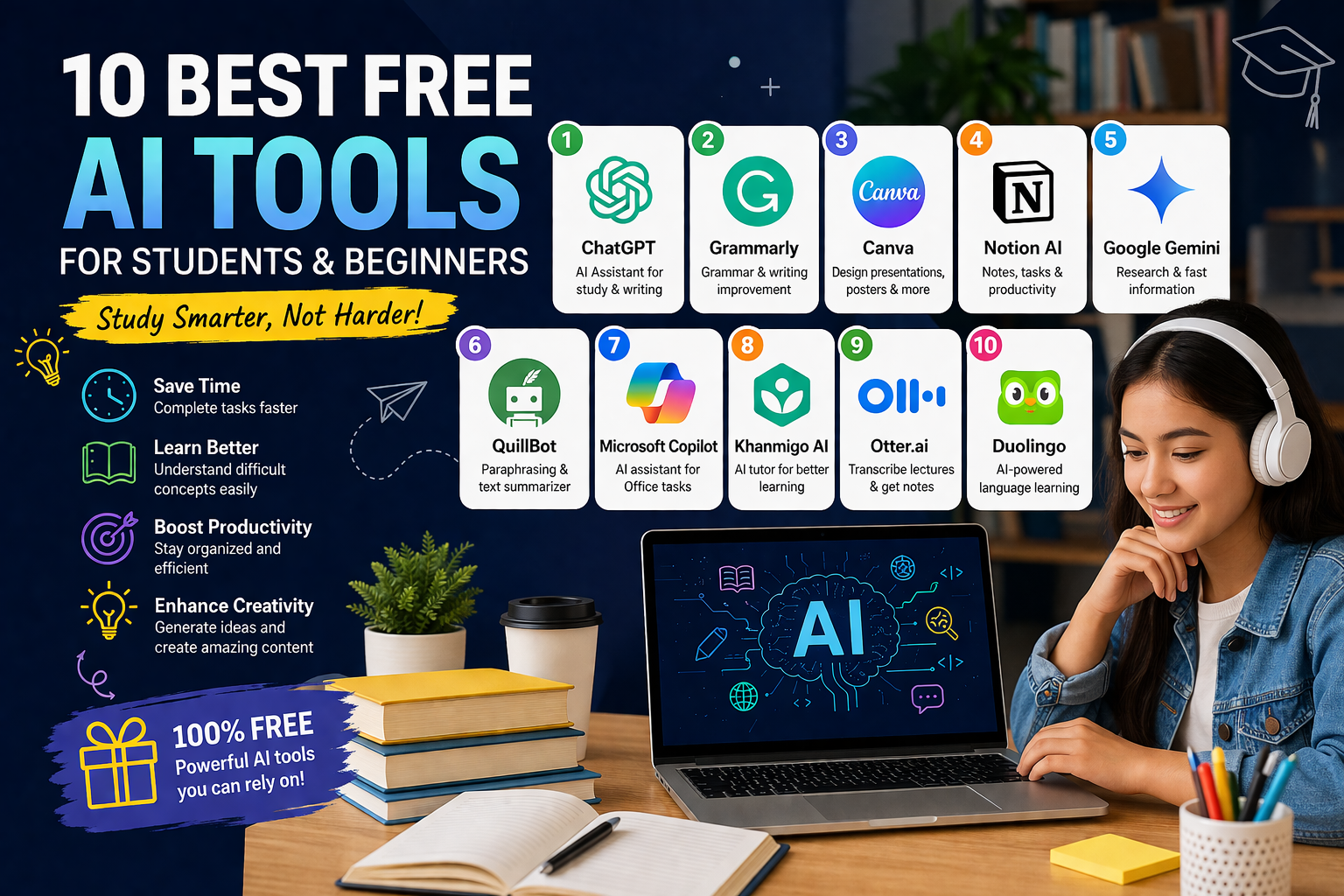
best free AI tools for students
Best Free AI Tools for Students & Beginners – Top 10 in 2026
Artificial Intelligence (AI) is no longer just a futuristic concept—it has become a daily companion for students and beginners across the world. Whether you’re writing assignments, learning programming, creating presentations, or improving productivity, AI tools can make your work faster, easier, and smarter.
The best part? Many powerful AI tools are completely free.
In this guide, we’ll explore the 10 best free AI tools for students and beginners in 2026, including their features, benefits, and ideal use cases.
Why Students Should Use AI Tools
Before diving into the list, it’s important to understand why AI tools are becoming essential:
1. Save Time
AI can complete tasks like summarizing notes, generating ideas, or solving problems in seconds.
2. Improve Learning
AI explains complex concepts in simple language, making it easier to understand subjects.
3. Boost Productivity
From writing essays to organizing schedules, AI tools help students stay efficient.
4. Enhance Creativity
AI can generate ideas, designs, and content that spark creativity.
1. ChatGPT – Best Overall AI Assistant
ChatGPT is one of the most popular AI tools used by students worldwide. It acts like a smart assistant that can answer questions, explain topics, and help with writing tasks.
Key Features:
- Answer academic questions
- Write essays and assignments
- Explain difficult concepts
- Help with coding and problem-solving
Why It’s Great:
It’s simple to use and supports multiple subjects, making it perfect for beginners.
Best For:
- Homework help
- Writing essays
- Learning new topics
2. Grammarly – Best for Writing Improvement
Grammarly is a must-have tool for students who want to improve their writing skills.
Key Features:
- Grammar and spelling correction
- Tone suggestions
- Sentence clarity improvements
Why It’s Great:
It helps students write professional and error-free content.
Best For:
- Essays
- Emails
- Reports
3. Canva – Best for Presentations & Design
Canva makes it easy to create stunning presentations, posters, and social media designs.
Key Features:
- Drag-and-drop design tools
- AI image generation
- Free templates
Why It’s Great:
Even beginners can create professional designs without design skills.
Best For:
- School presentations
- Posters
- Projects
4. Notion AI – Best for Note-Taking
Notion AI helps students organize notes, tasks, and study materials in one place.
Key Features:
- Smart note summarization
- Task management
- AI writing assistance
Why It’s Great:
It combines productivity and AI in a single platform.
Best For:
- Study notes
- Planning
- Organization
5. Google Gemini – Best for Research
Google Gemini is a powerful AI tool that helps with research and information gathering.
Key Features:
- Fast information retrieval
- Integration with Google services
- AI-generated summaries
Why It’s Great:
It provides reliable and quick answers for academic research.
Best For:
- Research projects
- Quick answers
- Study help
6. QuillBot – Best for Paraphrasing
QuillBot helps students rewrite content in a clearer and more original way.
Key Features:
- Paraphrasing tool
- Grammar checker
- Summarizer
Why It’s Great:
It helps avoid plagiarism and improves writing quality.
Best For:
- Rewriting assignments
- Improving sentences
- Summarizing text
7. Microsoft Copilot – Best for Office Work
Microsoft Copilot integrates with tools like Word, Excel, and PowerPoint.
Key Features:
- Document creation
- Data analysis
- Presentation generation
Why It’s Great:
It enhances productivity in everyday academic tasks.
Best For:
- Reports
- Excel work
- Presentations
8. Khan Academy (Khanmigo AI) – Best for Learning
Khan Academy’s AI tutor helps students learn subjects step-by-step.
Key Features:
- Personalized tutoring
- Practice exercises
- Step-by-step explanations
Why It’s Great:
It acts like a personal teacher for students.
Best For:
- Math
- Science
- Exam preparation
9. Otter.ai – Best for Notes from Lectures
Otter.ai converts speech into text, making it perfect for lectures.
Key Features:
- Real-time transcription
- Voice recording
- Meeting summaries
Why It’s Great:
Students can focus on listening instead of writing notes.
Best For:
- Online classes
- Lectures
- Interviews
10. Duolingo – Best for Language Learning
Duolingo uses AI to make learning languages fun and interactive.
Key Features:
- Gamified lessons
- Personalized learning
- Multiple languages
Why It’s Great:
It makes language learning easy and engaging.
Best For:
- Beginners
- Daily practice
- Vocabulary building
How to Choose the Right AI Tool
With so many options available, choosing the right tool depends on your needs:
For Writing:
- Grammarly
- QuillBot
For Studying:
- ChatGPT
- Khan Academy
For Design:
- Canva
For Productivity:
- Notion AI
- Microsoft Copilot
Tips for Using AI Tools Effectively
1. Don’t Depend Completely
Use AI as a helper, not a replacement for learning.
2. Verify Information
Always double-check facts provided by AI tools.
3. Use for Learning
Ask AI to explain concepts instead of just giving answers.
4. Avoid Plagiarism
Rewrite and understand content instead of copying.
Advantages of Free AI Tools
- No cost for students
- Easy to use
- Time-saving
- Improves productivity
Limitations to Consider
- Limited features in free plans
- Internet dependency
- Possible inaccuracies
Future of AI for Students
AI tools will continue to evolve and become even more powerful. In the future, students may have:
- Personal AI tutors
- Fully automated study plans
- Smart classrooms powered by AI
This will make learning more personalized and efficient.
Conclusion
AI tools are transforming how students learn, work, and grow. From writing essays to learning new languages, these tools provide powerful support for beginners and students alike.
The best part is that you don’t need to spend money to get started. These free AI tools offer everything you need to improve productivity and learning.
Top picks:
- Best overall: ChatGPT
- Best for writing: Grammarly
- Best for design: Canva
- Best for learning: Khan Academy
FAQs
1. What are AI tools for students?
AI tools are software applications that use artificial intelligence to help students with studying, writing, research, and productivity tasks.
2. Are AI tools free for students?
Yes, many AI tools offer free versions with useful features, though some may have premium upgrades.
3. Which is the best free AI tool for students?
Popular options include ChatGPT, Grammarly, and Canva.
4. Can beginners use AI tools easily?
Yes, most AI tools are designed with simple interfaces, making them easy for beginners to use.
5. How do AI tools help in studying?
They can summarize notes, explain concepts, generate ideas, and assist with homework.
6. Are AI-generated answers always correct?
No, students should always verify information, as AI can sometimes provide inaccurate answers.
7. Can AI tools help write assignments?
Yes, tools like ChatGPT and QuillBot can assist in writing and editing assignments.
8. Is it safe to use AI tools for academic work?
Yes, but avoid sharing personal or sensitive information on public platforms.
9. Can AI tools detect plagiarism?
Some tools help improve originality, but dedicated plagiarism checkers are also recommended.
10. Which AI tool is best for improving grammar?
Grammarly is widely used for grammar and writing improvement.
11. Can AI tools help with presentations?
Yes, Canva helps create visually appealing presentations easily.
12. Do AI tools support multiple languages?
Many tools support multiple languages, making them useful for global learners.
13. Can AI tools replace teachers?
No, AI tools assist learning but cannot replace human teachers and guidance.
14. Which AI tool is best for note-taking?
Notion AI is great for organizing notes and tasks.
15. Are AI tools useful for exams?
Yes, they help with revision, practice, and understanding concepts.
16. Can AI tools summarize long texts?
Yes, many AI tools can quickly summarize books, articles, and notes.
17. Do AI tools work on mobile devices?
Yes, most tools are available as mobile apps or web versions.
18. Which AI tool is best for research?
Google Gemini is helpful for quick research and information gathering.
19. Can AI tools help in coding?
Yes, tools like ChatGPT can assist with coding and debugging.
20. Are free AI tools enough for students?
Yes, free versions are usually sufficient for basic academic needs.
21. Can AI tools improve productivity?
Yes, they automate tasks and help students manage time better.
22. Which AI tool is best for lecture notes?
Otter.ai is useful for converting lectures into text.
23. Can AI tools help learn new languages?
Yes, Duolingo is a popular AI-powered language learning tool.
24. Are AI tools allowed in schools and colleges?
It depends on the institution, so students should follow their guidelines.
25. What is the future of AI for students?
AI will provide personalized learning, smart tutoring, and improved educational experiences.
best free AI tools for students
best free AI tools for students
best free AI tools for students
best free AI tools for students
best free AI tools for students
best free AI tools for students
best free AI tools for students
best free AI tools for students
best free AI tools for students
best free AI tools for students
best free AI tools for students
best free AI tools for students
best free AI tools for students
best free AI tools for students
best free AI tools for students
best free AI tools for students
- free AI tools for students
- best AI tools for beginners
- AI tools for students 2026
- AI tools for learning
- AI tools for homework
- AI apps for students free
- AI tools for study and notes
- AI tools for writing essays
- student productivity tools AI
- AI tools for school projects
- beginner AI tools list
- AI tools for online learning


